4 卡 RTX 4090 P2P 折腾记 —— 如何 Hack Rebar 和 Above 4G Decoding
背景
最近拿到了一台 4 卡 RTX 4090 的机器,但用的是一代至强可扩展(Skylake)+ 技嘉 C621-WD12 主板。我们直接把显卡装上虽然可以使用,但是缺少了 P2P 功能对 LLM 推理跑 TP 不友好,因此我进行了一番折腾。
由于 PCIe P2P 会从一张显卡 DMA 另一张显卡的显存 Bar 地址直接访问显存,因此首先需要确保 Bar 已经是显存大小,然而,我们的机器甚至主板 BIOS 都没有 Resizable Bar 支持,折腾由此开始。
Resizable Bar
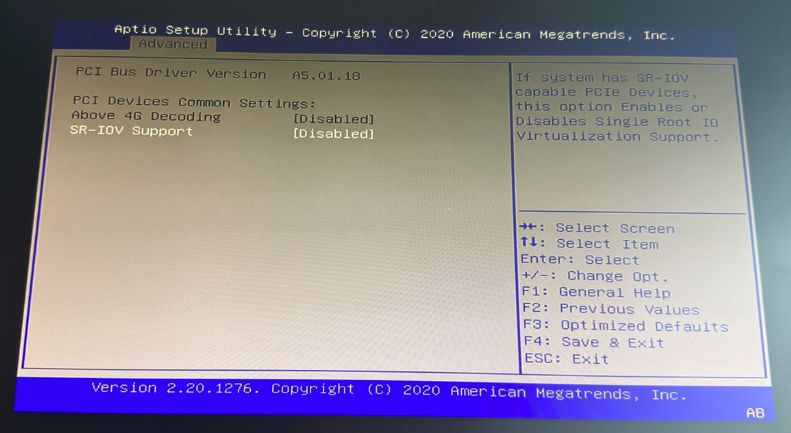
首先,这个主板的 BIOS 默认甚至打不开 Above 4GB Decoding,这意味着所有 PCIe Bar 都会被分配在 Sub 4GB 物理地址空间,而我们一张卡的显存都有 24G,那自然不可能被分配出来。

后来让 5.6 Sol 帮我上网搜索,在 Reddit 上找到了别人的解决方法,需要修改 Boot Mode 为 “UEFI with Secure boot”,默认是 “UEFI without Secure boot”,这个时候,我们就可以用 Above 4G Decoding了。
然而,主板的 BIOS 并没有提供启动阶段的 Resizable Bar 支持。朋友告诉我有 ReBarUEFI 的存在,但是我发现直接常规方法刷 BIOS 签名过不了,手头没有编程器,BMC 刷 BIOS 还让我撞到了 BMC 卡死的 Bug,不确定是不是和签名对不上有关。但是这个项目的 README 让我发现:
> Can I use Resizable BAR on my system without modifying BIOS ?
> You can use Linux with 4G Decoding on, recent versions will automatically resize and allocate GPU BARs.
然而, Kernel 和 NVIDIA 的 Driver 并没有帮我做这件事情。
我之前在老 Intel Mac 折腾 Thunderbolt 的时候依稀记得, Linux Kernel 启动参数加上 pci=realloc 即可让 Kernel 自己重新分配 pci 的地址空间。
我也是这个时候才明白,原来 BIOS 里的 Resizable Bar 的意思是,让 BIOS 帮你做好 ReBar,而不是让 PCIe 控制器能够支持 ReBar,它本来就支持。
几经辗转,我让 AI 帮我写了个内核模块,用 Linux Kernel 的 pci_resize_resource,果然把 32G 的 Bar 开出来了。
sudo lspci -vvv
18:00.0 VGA compatible controller: NVIDIA Corporation AD102 [GeForce RTX 4090] (rev a1) (prog-if 00 [VGA controller])
        Subsystem: NVIDIA Corporation AD102 [GeForce RTX 4090]
        Control: I/O+ Mem+ BusMaster+ SpecCycle- MemWINV- VGASnoop- ParErr+ Stepping- SERR+ FastB2B- DisINTx+
        Status: Cap+ 66MHz- UDF- FastB2B- ParErr- DEVSEL=fast >TAbort- <TAbort- <MAbort- >SERR- <PERR- INTx-
        Latency: 0
        Interrupt: pin A routed to IRQ 273
        NUMA node: 0
        IOMMU group: 7
        Region 0: Memory at 92000000 (32-bit, non-prefetchable) [size=16M]
        Region 1: Memory at 384000000000 (64-bit, prefetchable) [size=32G]
        Region 3: Memory at 384800000000 (64-bit, prefetchable) [size=32M]
但是开出来之后我越想越觉得不对,为什么 NVIDIA 自己的 Driver 不提供这个功能呢,为什么一旦 BIOS 不去在启动时做 ReBar ,Driver 就选择摆烂呢?
于是继续让 AI 调研,果然发现 NVIDIA 驱动有一个选项:NVreg_EnableResizableBar=1:
/*
 * Option: EnableResizableBar
 *
 * Description:
 *
 * When this option is enabled, the NVIDIA driver will attempt to resize
 * BAR1 to match framebuffer size, or the next largest available size on
 * supported machines. This is currently only implemented for Linux.
 *
 * Possible values:
 *  0 - Do not enable PCI BAR resizing
 *  1 - Enable PCI BAR resizing
 */
因此,我果断删掉自己的内核模块,换成了 NVreg_EnableResizableBar=1。从此 ReBar 问题解决。
我也去 ReBar UEFI 交了个 PR 防止大家像我一样想到这个,继续做出这种白烧 Token 的事情。
P2P
P2P 的解决方案就很多了,参考了 Harry 的博客 找到了 github.com:aikitoria/open-gpu-kernel-modules,直接 DKMS 安装即可。
最终效果如下:
➜  ~ nvidia-smi topo -p2p r
    GPU0    GPU1    GPU2    GPU3
 GPU0   X   OK  OK  OK
 GPU1   OK  X   OK  OK
 GPU2   OK  OK  X   OK
 GPU3   OK  OK  OK  X

Legend:

  X    = Self
  OK   = Status Ok
  CNS  = Chipset not supported
  GNS  = GPU not supported
  TNS  = Topology not supported
  NS   = Not supported
  DR   = Disabled by regkey
  U    = Unknown